The Vinyasa difference
Structured UI
prototyping.
Not a picture of an interface. Not a promise of production code. An editable design document you can inspect, change and discuss.
More than a visual impression
An idea you can
keep working with.
Use an image to communicate the look. Keep a structured project to continue the design: inspect what is there, follow where it goes and carry the source into the next review.
RELAY / real CRM example
A field is still a field.
A screen is still a screen.
The contact list, stage selector and notes retain their types, IDs and layout relationships. You can revise a specific element instead of recreating the whole picture.
The design has an addressable structure.
Open the complete CRM example- textcrm-brand
- textcrm-title
- inputcrm-search
- dropdowncrm-filter
- framecrm-list4 children
- textcrm-note
See the scope, not just one control
Real workflows.
Ready to explore.
Switch between a customer workspace, an appointment journey, mobile onboarding and a support console. Each is a complete editable document with named screens and linked actions.
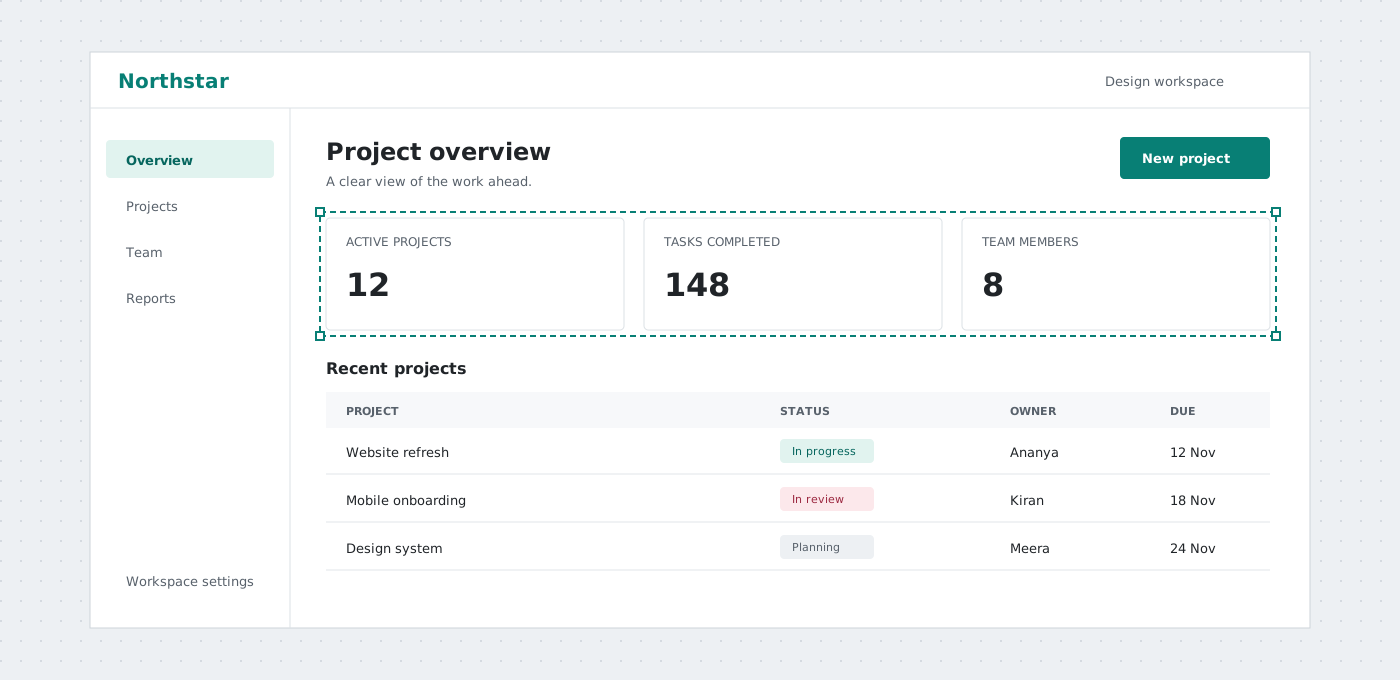
A small change. A visible difference.
Same button.
Same ID. New position.
A deterministic example, not a live AI request: the proposed document moves Save changes down by 16 pixels and preserves everything else.
Readable structure
The interface has an underlying model.
Pages, typed elements, supported properties and nested frames form a document. Row and column layouts express relationships; a screenshot alone cannot preserve those relationships as Vinyasa objects.
Document structureA real element identity
type: button
id: save-button
pageId: account
left: 102
top: 246
text: Save changesPrecise changes
Change one property.
Keep the rest.
Stable IDs let a validated update target one element. You can compare the intended change without asking an assistant to redraw or regenerate the entire screen.
Review YAML changesIllustrative document diff
  id: save-button
  left: 102
- top: 246+ top: 262 text: Save changesReviewed AI
Assistance without a silent overwrite.
Copilot inspects bounded document slices, proposes operations and validates the result. The proposal stays separate from the canvas until you review and apply it. External agents use the hosted MCP contract.
AI limits and reviewThe decision stays with you
Model access and quotas depend on your provider. No guaranteed token savings, generation speed or automatic fallback.
Useful handoff
Keep the source.
Share the view.
Use .rvv for continued Vinyasa editing, YAML for structured review, and PNG or SVG for visual discussion. A developer still implements the production application and its behavior.
MCP document toolsChoose the artifact for the next person
- EDIT.rvv project
- DIFFDocument YAML
- SHAREPNG / SVG
Different tools. Different artifacts.
Choose what you need
for this stage.
| The next task | Image mockup | Vinyasa prototype | Production application |
|---|---|---|---|
| Discuss visual direction | A useful visual reference | Editable screens and flows | A running implementation |
| Change a control by ID | No Vinyasa element model | Validated document edits | Change application source |
| Review a structured diff | Compare visual revisions | YAML and stable identities | Source-code review |
| Run backend logic | No | No | Implemented separately |
Vinyasa is for prototypes and clearer implementation briefs. It is not a production-code generator, a multiplayer design platform or an automatic replacement for design review.
Why structure matters in practice
Make decisions
that survive the review.
The benefit is not more output for its own sake. It is a clearer connection between what you asked to change, what changed and what should happen next.
- Identity, not visual guesswork
- A stable element ID gives a reviewer or agent a specific target. Ask for a change to save-button instead of relying on an ambiguous instruction such as the green button near the bottom.
- Relationships, not only coordinates
- Frames express rows, columns, padding and gaps. Pages express screen ownership. Review the structure as well as the appearance when adding a field or extending a form.
- Proposals, not silent replacement
- AI-generated operations remain a proposal until you inspect and apply them. Review additions, updates, removals and validation feedback rather than accepting a regenerated screen on appearance alone.
- Document tools, not hidden browser control
- The hosted MCP server operates on supplied document data. Tool results can be inspected before a project is opened. Connecting a client does not grant remote access to your current canvas.
- Source for editing, images for discussion
- An editable project and a visual export serve different people. Keep the .rvv project and document YAML so that a later revision does not begin by recreating a screenshot.
- Explicit scope, fewer assumptions
- A linked checkout screen is not a payment system. A calendar is not a reservation service. Mark the intended interaction and document the backend, permissions and validation work separately.
Put the difference to work
Three ordinary changes.
A more deliberate process.
A new requirement
Add one field to onboarding
Start with the mobile setup wizard. Add a field to its column frame, review the spacing and update the next-step link only if the flow changes. Record the validation and persistence requirements for implementation.
A missing state
Design the empty customer list
Use the CRM contact flow. Keep the populated list and create a separate no-results or first-use page. Compare the language and recovery action without deleting the original state.
A clearer handoff
Explain a booking conflict
Extend the appointment prototype with an unavailable-time state. Link back to calendar selection and explain the intended server check. Share both the visual journey and editable project.
Choose deliberately
Where Vinyasa fits.
Where it does not.
Choose Vinyasa when you want editable screen structure, YAML inspection and reviewed document changes. Choose the next tool according to the artifact your team needs.
Compare workflowsWhen is a structured wireframe useful?
When requirements are still moving, a team needs to compare screen flows, or a developer needs a concrete implementation reference. The editable model is especially useful when a change should preserve the rest of the document.
When should I use a dedicated design tool?
Use a specialist tool when your main requirement is high-fidelity brand design, complex visual effects, a mature design-system workflow or real-time multiplayer collaboration. Evaluate the current product capabilities against your own needs.
What still needs to be built after a prototype?
Responsive application code, real data connections, authentication, permissions, persistence, error recovery, accessibility and deployment. Treat the prototype as a design reference and a conversation about requirements, not proof that those behaviors work.
What should be reviewed before accepting an AI edit?
Check the requested scope, affected IDs, page ownership, links, layout and validation feedback. Confirm that unrelated elements remain unchanged. A valid document can still contain an unsuitable design, so visual and product judgment remain necessary.
How should a team handle project revisions?
Keep an editable project backup, record the purpose of the revision and share YAML when a text diff is useful. Agree on a revision owner. Vinyasa does not automatically merge concurrent project edits or provide a live shared canvas.
What should I share with an external model or agent?
Only the document content needed for the task, using synthetic or approved data. Review your provider settings and the Vinyasa privacy guidance first. A document-driven workflow is not a reason to include credentials or confidential customer records.
Try it on your own idea
Make something editable.
Start in the hosted editor, or explore a complete example.